
Artificial Intelligence (AI) is no longer a distant future—it’s here, shaping everything from voice assistants to smart toys. For kids, understanding AI early can unlock creativity, problem-solving skills, and future career opportunities. But learning doesn’t have to mean dry textbooks or complex coding. The best AI education for kids blends play, hands-on experiments, and real-world applications.
This guide explores the most engaging ways for children to dive into AI: from innovative board games and interactive apps to structured classes and complementary tools that foster curiosity. Whether your child is a budding coder or just loves puzzles, these adventures make AI accessible, fun, and deeply educational.
Why AI Learning Matters for Kids
AI literacy isn’t just about future jobs—it’s about understanding the world. Kids who grasp AI concepts early develop:
- Computational thinking: Breaking problems into logical steps.
- Creativity: Designing AI-driven solutions (e.g., a game that adapts to players).
- Critical thinking: Questioning how AI makes decisions (e.g., why a chatbot gives certain answers).
- Resilience: Debugging and iterating on projects.
According to MIT’s Media Lab, introducing AI through play helps kids see technology as a tool they can shape—not just consume. The key? Start with tangible, screen-free activities before moving to digital platforms.
Top 5 AI Learning Adventures for Kids
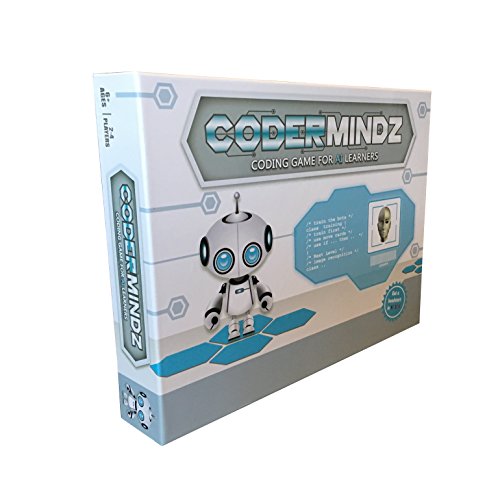
1. CoderMindz: The AI Board Game That Teaches Like a Pro
Forget screens—this award-winning board game turns AI fundamentals into a family-friendly challenge. Created by a 9-year-old inventor, CoderMindz demystifies concepts like image recognition, training data, and autonomous behavior through gameplay.
 CoderMindz in action: Kids learn AI by training a "robot" to complete missions.
Why it stands out:
- Hands-on learning: Uses physical cards and tokens to simulate AI training (e.g., teaching a bot to recognize animals).
- Coding basics: Introduces loops, conditionals, and functions without a computer.
- Scalable difficulty: Suitable for ages 6+; older kids can tackle advanced challenges.
- Free curriculum: Downloadable lesson plans for parents/teachers to extend learning.
- Media buzz: Featured on the NBC TODAY Show for its innovative approach.
Practical tips:
- Start with the "Training Mode" to grasp how AI learns from examples.
- Pair with a reliable machine for digital follow-up activities.
- Common mistake: Skipping the rulebook’s "AI Concepts" section—this is where the magic happens!
Where to buy: Amazon
2. AI-Powered Coding Platforms: From Blocks to Real Code
For kids ready to code, these platforms use AI to make learning interactive:
| Platform | Age Range | Key Feature | Cost |
|---|---|---|---|
| Scratch (MIT) | 8–16 | Drag-and-drop coding with AI extensions | Free |
| AI World School | 10–15 | Project-based AI courses (e.g., build a chatbot) | Paid |
| Code.org’s AI Tutorials | 6–18 | Hour of Code activities with AI themes | Free |
| Tynker | 5–18 | Game-based coding with AI/ML modules | Freemium |
Pro tip: Start with Scratch’s AI add-ons (like the Machine Learning for Kids integration) to train simple models (e.g., a rock-paper-scissors predictor). For hardware lovers, pair coding with LEGO Mindstorms to see AI in action.
3. Robotics Kits: AI Meets Hands-On Building
Robotics bridges AI and engineering. These kits let kids build and program smart robots:
- Sphero Bolt: A spherical robot with AI-powered sensors. Kids code its behavior using block-based or JavaScript.
- Wonder Workshop’s Cue: A chatbot robot that responds to voice commands and learns from interactions.
- Makeblock mBot Neo: A DIY robot with AI modules for line-following, obstacle avoidance, and more.
 AI-powered robots like Sony’s Aibo (pictured) inspire kids to explore human-machine interaction.
Why robotics?
- Tangible results: Kids see their code control a physical object.
- Cross-disciplinary: Combines coding, math, and physics.
- Teamwork: Great for group projects or family tech time.
Watch out for: Kits with poor documentation. Opt for brands with active communities (e.g., LEGO’s user forums).
4. AI Apps and Games: Learning on the Go
For screen time that teaches:
- Google’s Teachable Machine: Train a simple AI model to recognize images, sounds, or poses (ages 10+).
- AI Dungeon: A text-based adventure game where AI generates stories based on prompts (ages 12+).
- Lightbot: A puzzle game that introduces coding logic (ages 6+).
Parent hack: Use these apps to discuss AI ethics. Ask: "Why did the AI suggest that? Could it be wrong?"
5. Creative AI Tools: Art, Music, and More
AI isn’t just for coders—it’s for creators too!
- DALL·E Mini (now Craiyon): Generate images from text prompts. Kids can explore how AI "imagines" concepts.
- AIVA: Compose music with AI assistance.
- Runway ML: Edit videos with AI-powered tools (e.g., remove backgrounds).
Educational twist: Have kids compare their drawings to AI-generated art. What’s different? What’s the same?
Complementary Tools for Well-Rounded Learning
While AI is the focus, these tools support the whole child—creativity, focus, and emotional well-being:
For Creativity: Customizable Stickers
Personalizing tech (like laptops or Amazon Fire tablets) makes learning feel theirs. Try:
300-Piece Sticker Packs: Waterproof, non-toxic, and endlessly fun.
 Bright, durable stickers for water bottles, laptops, and more.
Greingways UV-Protected Stickers: Extra durability for outdoor gear.
 Bright, durable stickers for water bottles, laptops, and more.
For Focus: Sensory Worry Stones
AI learning requires concentration. These sensory stones help kids self-regulate:
- 6-Pack Silicone Stones: Quiet, portable, and safe for ages 8+.
 A tactile tool to reduce anxiety during challenging tasks.
Pro tip: Use worry stones during "debugging breaks" when coding gets frustrating.
How to Choose the Right AI Adventure for Your Child
| Child’s Interest | Best AI Learning Path | Recommended Age | Next Steps |
|---|---|---|---|
| Loves puzzles | CoderMindz board game | 6–12 | Try math game boards next. |
| Enjoys building | LEGO Mindstorms + AI modules | 10+ | Explore robotics clubs. |
| Gamer at heart | AI Dungeon or Scratch | 8–16 | Design a game with Nintendo Switch coding tools. |
| Creative soul | DALL·E Mini or AIVA | 10+ | Combine with eco-friendly STEM toys. |
| Future engineer | AI World School courses | 12+ | Pair with air quality monitors for real-world data projects. |
FAQ: AI Learning for Kids
Q: What’s the best age to start AI? A: Ages 6–8 can begin with unplugged activities (e.g., CoderMindz). Ages 10–12 can dive into block coding (Scratch) or robotics. Teens can explore Python-based AI libraries (e.g., TensorFlow for Kids).
Q: Does my child need coding experience? A: No! Tools like Scratch or Teachable Machine use visual interfaces. Coding helps but isn’t required to start.
Q: Are there free AI resources? A: Yes! Try:
Q: How can I support AI learning at home? A:
- Discuss AI in daily life: "How do you think Netflix recommends shows?"
- Encourage projects: Build a simple chatbot or train an image classifier.
- Visit tech museums: Many offer AI exhibits (e.g., the Museum of Science and Industry).
Q: Is AI safe for kids? A: Most kid-focused AI tools are designed with safety in mind. However:
- Avoid platforms that collect personal data.
- Supervise younger kids using generative AI (e.g., DALL·E).
- Teach critical thinking: "Not everything an AI says is true!"
Q: Will AI replace jobs? Should my child still learn it? A: AI will change jobs—not necessarily replace them. Learning AI helps kids create with technology, not just use it. Skills like problem-solving and creativity remain irreplaceable.
Final Thoughts: Raising AI-Savvy Kids
The best AI education for kids doesn’t feel like school—it feels like play. Whether through a board game like CoderMindz, a robotics kit, or a creative AI app, the goal is to spark curiosity and confidence.
Your next step:
- For beginners: Start with CoderMindz or Scratch.
- For builders: Try LEGO Mindstorms or Sphero Bolt.
- For creators: Explore DALL·E Mini or AIVA.
Remember: The future belongs to those who understand AI—and the best way to learn is by doing. Let the adventure begin!